
Last updated on
Oct 31, 2026

Get the free Loan Officer Checklist
We are not affiliated with any brand or entity on this form

Fill out
Complete the form online in a simple drag-and-drop editor.

eSign
Add your legally binding signature or send the form for signing.

Share
Share the form via a link, letting anyone fill it out from any device.

Export
Download, print, email, or move the form to your cloud storage.
Why pdfFiller is the best tool for your documents and forms


End-to-end document management
From editing and signing to collaboration and tracking, pdfFiller has everything you need to get your documents done quickly and efficiently.
Accessible from anywhere
pdfFiller is fully cloud-based. This means you can edit, sign, and share documents from anywhere using your computer, smartphone, or tablet.
Secure and compliant
pdfFiller lets you securely manage documents following global laws like ESIGN, CCPA, and GDPR. It's also HIPAA and SOC 2 compliant.
What is Loan Checklist
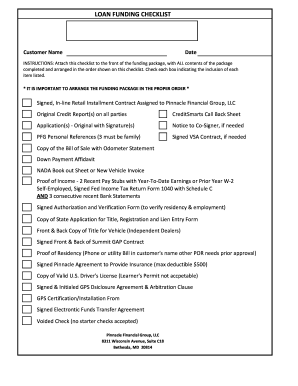
The Loan Officer Checklist is a business form used by loan officers to track the progress of a loan application efficiently.
pdfFiller scores top ratings on review platforms




So far all is formatted well for my document needs..
Excelente ferramenta para vários tipos de trabalhos.
Who needs Loan Checklist?
Explore how professionals across industries use pdfFiller.

Loan Checklist is needed by:
-
Loan Officers managing loan applications
-
Mortgage Lenders reviewing credit applications
-
Financial Institutions assessing loan qualifications
-
Real Estate Agents advising clients on mortgage processes
-
Applicants seeking approval for loans
-
Compliance Officers ensuring document integrity
Comprehensive Guide to Loan Checklist
What is the Loan Officer Checklist?
The Loan Officer Checklist is a crucial tool used by loan officers to effectively track the progress of loan applications. Its primary function is to provide a systematic approach to monitoring various stages from initial application to final loan approval. Key components of this checklist include sections dedicated to preliminary review and creditworthiness assessment, ensuring a thorough evaluation of an applicant's financial background. This comprehensive checklist significantly aids in the overall loan approval process, enhancing accuracy and efficiency throughout.
Purpose and Benefits of the Loan Officer Checklist
The Loan Officer Checklist offers numerous advantages for both loan officers and applicants. By streamlining document preparation and tracking, it minimizes the potential for errors that could delay the loan process. Additionally, it plays a vital role in ensuring complete and thorough credit verification and equity verification. This level of organization not only enhances the efficiency of loan processing but also supports a smoother experience for all parties involved.
Key Features of the Loan Officer Checklist
This checklist is designed with several key features that enhance its functionality. It includes fillable fields that allow users to quickly input necessary information, along with checkboxes for easy tracking of completed tasks. The user-friendly design facilitates a step-by-step tracking process, and customizable sections enable tailoring for specific lending practices. This adaptability ensures that the checklist meets the various needs of loan officers and lenders alike.
Who Needs the Loan Officer Checklist?
Several roles within the loan application process can benefit from utilizing the Loan Officer Checklist. Primarily, it serves loan officers and lenders who rely on it to ensure accuracy and thoroughness in evaluating applications. Other stakeholders, such as applicants and mortgage brokers, also find the checklist useful for their distinctive needs. Each group engages with the checklist differently, ensuring that the loan processing experience is efficient and streamlined.
How to Fill Out the Loan Officer Checklist Online (Step-by-Step)
To effectively complete the Loan Officer Checklist using pdfFiller, follow these steps:
-
Access the form through the pdfFiller platform.
-
Begin filling in essential fields, such as 'Applicant's name' and 'Date'.
-
Utilize the checkboxes and available instructions to guide your completion.
-
Ensure accuracy by reviewing entered data and selecting appropriate options.
-
Use pdfFiller's formatting and editing tools to finalize the document.
Common Errors and How to Avoid Them
While filling out the Loan Officer Checklist, it's vital to be aware of common errors that could hinder the approval process. Frequent mistakes may include incorrect data entries or neglecting to complete required sections. To mitigate these issues, adopt practical strategies such as double-checking submissions for accuracy. Utilizing the error-checking tools available in pdfFiller can significantly reduce the likelihood of mistakes.
Security and Compliance for the Loan Officer Checklist
Understanding security and compliance is essential when handling the Loan Officer Checklist. pdfFiller employs robust security features, including 256-bit encryption and adherence to HIPAA and GDPR regulations, ensuring safety for sensitive applicant information. These data protection measures instill confidence in users, knowing that their documents are managed securely and responsibly.
How to Sign or Notarize the Loan Officer Checklist
Securing the appropriate signatures on the Loan Officer Checklist is critical. Both the loan officer and lender must provide their signatures to validate the document. Users should be aware of the differences between digital and wet signatures, as they may be accepted differently by various institutions. To digitally sign the checklist, pdfFiller simplifies the process, guiding users through the necessary steps efficiently.
Submitting the Loan Officer Checklist
When it comes to submitting the Loan Officer Checklist, it is important to understand the various acceptable channels. Submissions can be made online, through email, or by mail, depending on specific lender requirements. Tracking submissions and confirming receipt is crucial to ensure that the checklist is processed without delays. Be mindful of any associated fees or deadlines that may apply to your submission process.
Start Using the Loan Officer Checklist with pdfFiller
Consider adopting pdfFiller for your Loan Officer Checklist needs. This platform is designed for ease of use, providing users with access to essential features that facilitate secure and efficient form management online. Engage with pdfFiller today to create, fill, and eSign your Loan Officer Checklist seamlessly.
How to fill out the Loan Checklist
-
1.Access the Loan Officer Checklist on pdfFiller by searching the form name within the platform or navigating to your document library if previously uploaded.
-
2.Once the form is open, begin by filling in your personal details, such as the Applicant's Name and Phone Number, into the designated fields using the fillable functions.
-
3.Make sure to gather required supporting documents such as income statements and identification to input accurate information in the checklist.
-
4.Navigate through the form, ensuring all fields and checkboxes are appropriately completed, following any prompts or instructions provided within the document.
-
5.After filling in all necessary sections, review your information for accuracy and completeness, paying close attention to any instructions related to the loan process.
-
6.Finalize the form by checking off all required steps, ensuring you've signed where indicated, and moving to the submission section of pdfFiller.
-
7.To save, download, or submit the completed checklist, make use of pdfFiller's options typically found in the top or side menus, selecting the format that best suits your needs.

What are the eligibility requirements for using the Loan Officer Checklist?
To use the Loan Officer Checklist, you need to be a licensed loan officer or affiliated with a financial institution involved in loan processing. This form is designed specifically for professional use in managing loan applications.
Are there any deadlines associated with submitting the Loan Officer Checklist?
While there are no strict deadlines for the Loan Officer Checklist itself, it is crucial to complete it promptly to ensure timely processing of loan applications, especially if there are time-sensitive offers or rates.
How do I submit the Loan Officer Checklist after completion?
Once completed, the Loan Officer Checklist can be submitted via email to interested parties or printed for physical submission. Ensure all sections are filled out completely before submission.
What supporting documents do I need when filling out the checklist?
Supporting documents may include applicant identification, income verification, credit reports, and any other necessary financial information that demonstrates creditworthiness or fulfills lender requirements.
What are common mistakes to avoid when filling out the checklist?
Common mistakes include missing fields, providing incorrect or incomplete information, and neglecting to sign where required. Double-check all sections before finalization to avoid delays in the loan process.
How long does processing take once the checklist is submitted?
Processing times vary based on lender policies but generally take anywhere from a few days to a couple of weeks. Early submission of a complete checklist can expedite the review process.
Can any modifications be made to the checklist after it’s been filled out?
Yes, modifications can be made before submitting the checklist. If changes are needed post-submission, contact the relevant lender or institution to discuss the process for updating submitted documents.
Related Content
Related Forms





Related Catalogs
Get the latest insights from our blog


If you believe that this page should be taken down, please follow our DMCA take down process
here
.
This form may include fields for payment information. Data entered in these fields is not covered by PCI DSS compliance.